Microsoft 365 Integration: Automatic Time Tracking with Outlook and Planner
The Problem: Meetings and Appointments Disappear in Time Tracking
Everyone knows it: The calendar is packed with meetings, the day flies by, and in the evening you sit in front of time tracking wondering where the eight hours went. The result: inaccurate entries, forgotten meetings, and a guilty conscience.
Yet your own Microsoft 365 ecosystem already knows what you did all day. Outlook knows the appointments, Teams knows the calls, Planner knows the tasks. The only thing missing is the connection to time tracking.
The Solution: Automatic Time Tracking Through Integration
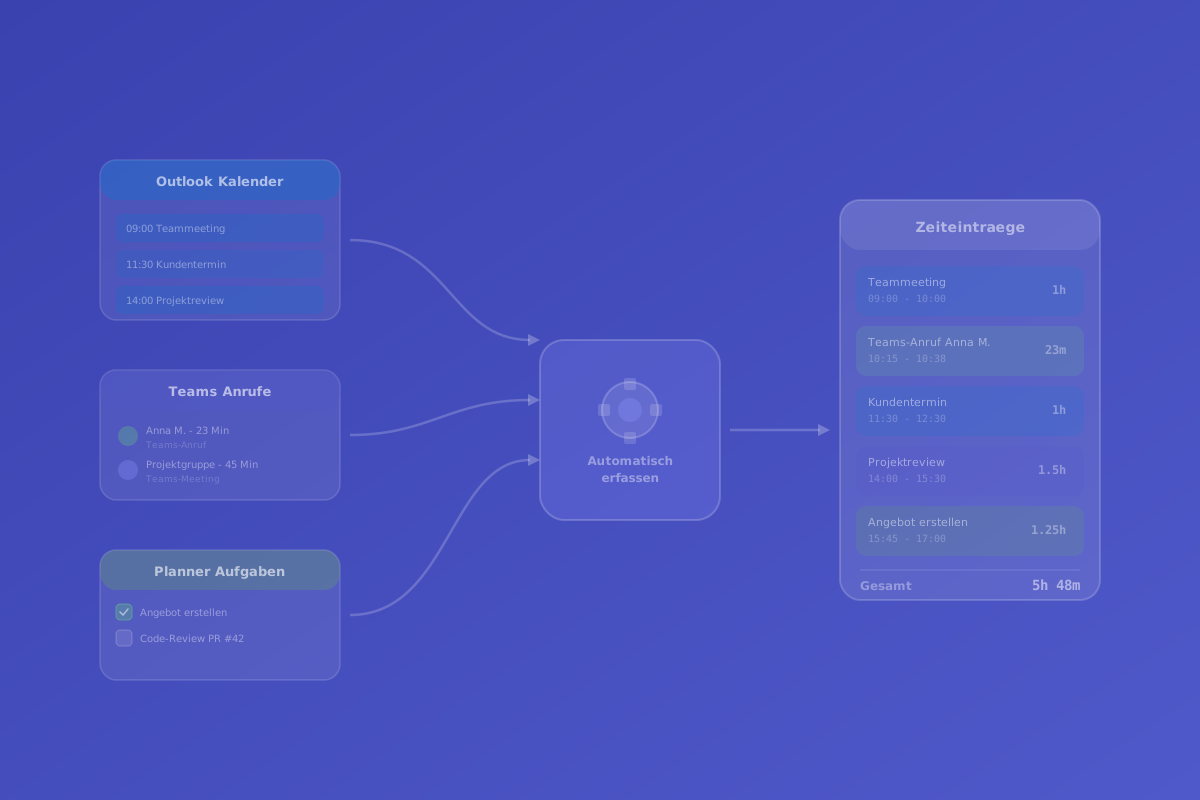
timeghost Time Tracking bridges exactly this gap. Through native integration with Microsoft 365, existing activities automatically flow into time tracking — without manual typing, without copying calendar entries.
Outlook Appointments as Time Suggestions
Every accepted Outlook appointment automatically appears as a time suggestion in timeghost Time Tracking. At the end of the day, employees see a list of their appointments and can adopt them as time entries with one click.
Intelligent filtering is applied:
- All-day events (e.g., out-of-office notices) are ignored
- Declined appointments do not appear as suggestions
- Recurring appointments are displayed individually as suggestions
- Project assignment can be automated via rules (e.g., "All appointments with Client X → Project X")
Teams Calls and Meetings
Teams calls and meetings are automatically recognised and recorded as time suggestions with duration and participant list. This is particularly useful for:
- Consulting firms that bill client calls by the minute
- Support teams that document processing times
- Project managers who want to know how much meeting time goes into a project
Automatic recognition works for both scheduled meetings and spontaneous calls.
Planner Tasks Booked to Projects
Microsoft Planner is the central task management tool for many teams. timeghost recognises Planner tasks and enables booking time directly against tasks. This creates a seamless chain from task planning to time reporting.
The workflow:
- Create a task in Planner (e.g., "Draft proposal")
- Start the timer in timeghost Time Tracking and select the Planner task
- Time tracking stops automatically when the next task is started
- Reports show how much time was spent per task and per project
Configuration: Which Sources Should Flow In?
Not every company wants to activate all sources. In timeghost settings, you can granularly control:
- Outlook integration: On/off, with filter options for specific calendars
- Teams integration: Automatic recognition of calls and meetings
- Planner integration: Linking Planner boards with timeghost projects
All integrations work with the Microsoft Graph API and use existing Microsoft 365 permissions. No additional admin rights are required, and all data stays within the Microsoft ecosystem.
Real-World Example: A Typical Day with Automatic Time Tracking
08:30 — Check-in in timeghost Time Tracking (one click in the Teams app)
09:00 — Team meeting in Teams → automatically recorded as a time suggestion
10:00 — Work on Planner task "Write concept" → timer runs on the assigned project
11:30 — Outlook appointment "Client call Company ABC" → appears as a time suggestion with project assignment
12:00 — Lunch break → automatic break reminder
13:00 — Teams call with supplier → recorded as a time suggestion
14:00 — Continue work on Planner task → timer keeps running
17:00 — Check-out → timeghost shows the daily overview with all automatically recognised time entries. Employees confirm or adjust.
Total time spent on time tracking this day: approx. 2 minutes.
Data Protection with the Integration
The Microsoft 365 integration processes exclusively metadata (appointment subject, duration, participants). Content from emails, chat messages, or documents is not read. All data remains in the EU and is subject to the same GDPR-compliant conditions as the entire timeghost platform.
Conclusion: Less Typing, More Accurate Tracking
Automatic time tracking through Microsoft 365 integration solves one of the biggest problems with manual time tracking: the effort. Instead of typing each entry individually, employees simply confirm at the end of the day what they've already been doing. The result: more accurate data with minimal effort.
Sources and further information
- Microsoft Graph API – Documentation
- timeghost Time Tracking on the Microsoft Teams App Store
- Work time tracking – features in detail
- Project time tracking – features in detail
- Install in Microsoft Teams
Related Articles
- Time Tracking in Microsoft Teams: How to Get Started
- Boost Project Efficiency with Automated Time Tracking
Content created with AI assistance and editorially reviewed. Current as of April 2026.
About the Author

timeghost Team
Editorial
Share article